The direct answer, checked July 7, 2026
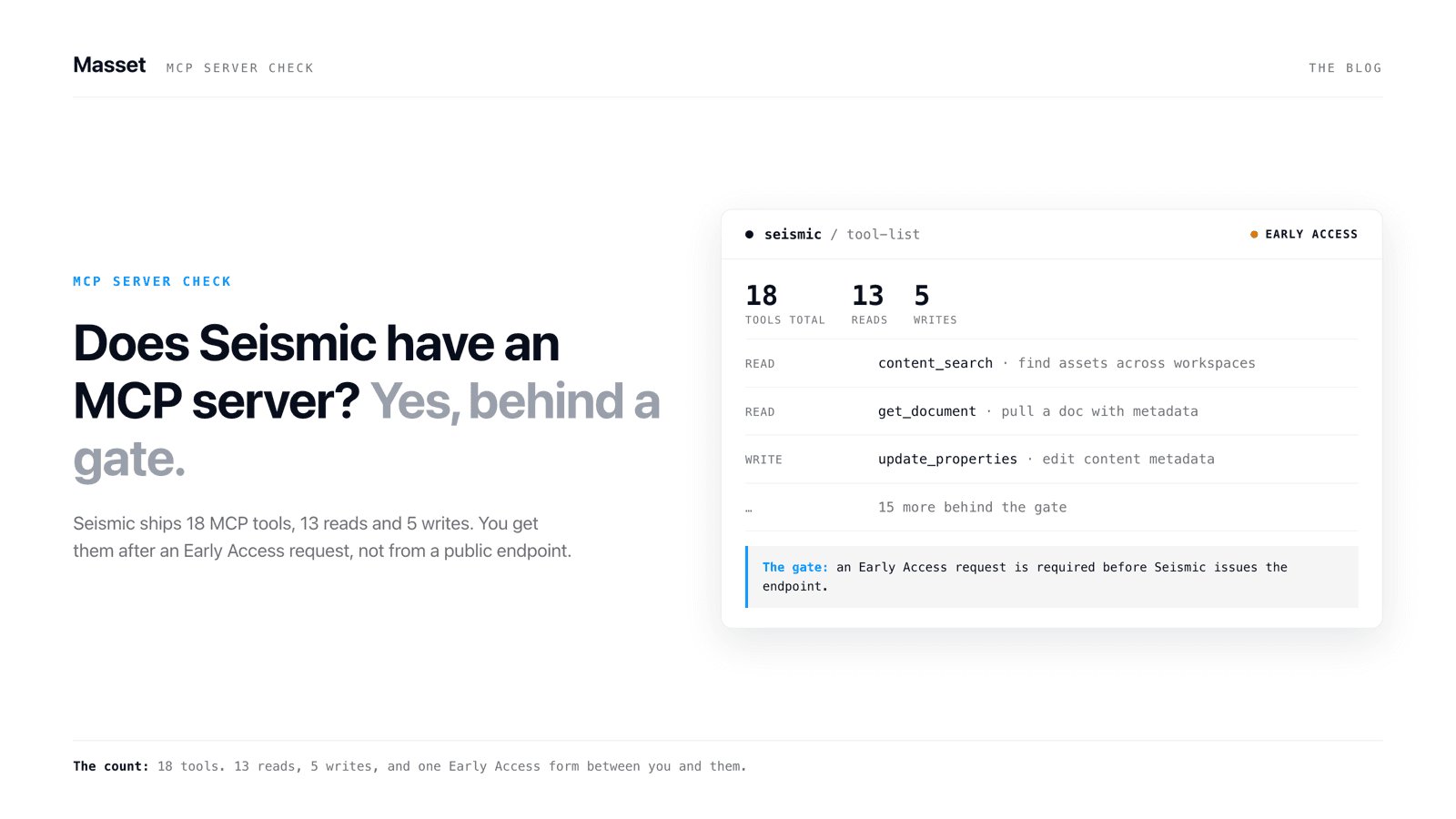
Yes. Seismic has a first-party MCP server. It's in Early Access as of July 7, 2026, and it exposes 18 tools to Claude, ChatGPT, and Microsoft Copilot Studio. The catch: you have to ask your Customer Success Manager to turn it on. Then a Seismic admin has to enable each of the 18 tools by hand.
I'm writing this because the search results for this question are a mess. Seismic's own developer docs are accurate but written for engineers who already decided to integrate. One competitor's page still ranks while claiming Seismic's MCP support is unconfirmed. That was true in April 2025. It has been wrong for over a year. And a couple of the other results are about geology and earthquakes, because "seismic" is also a word geologists use. Different seismic.
Everything below comes from primary sources, checked on July 7, 2026.
- Seismic's MCP server developer docs (last updated around June 29, 2026)
- Microsoft's connector docs for "Seismic MCP" in Copilot Studio (Preview)
- Seismic's press releases from October 2025, February 2026, and June 2026
- The Highspot merger announcements from February 12, 2026
- Seismic's newsroom for a merger closing announcement (none found)
In plain terms: I read Seismic's developer documentation, which was updated around June 29, 2026, Microsoft's connector page, the three seasonal release announcements, and both sides of the Highspot merger news. When something below is a gap or a guess, I say so.
What the Seismic MCP server actually is
It's a hosted, remote MCP server at mcp.seismic.com. Your AI connects over Streamable HTTP using MCP spec version 2025-11-25. You point a client at your tenant endpoint (https://mcp.seismic.com/v1/tenants/<your_tenant>), sign in with OAuth, and the AI sees whatever tools your admin enabled. Nothing to host on your side.
The server grew out of Seismic's Aura AI push, and the timeline matters if you're trying to judge how serious they are.
Aura AI Agents announced. MCP support is a stated intention, not a product.
Winter 2026 release announces MCP support as shipped capability.
Spring 2026 release: nine new Aura Agents. 248 organizations use Aura AI.
MCP server in Early Access: 18 tools, CSM-gated, docs actively maintained.
So: October 2025, Seismic says it's "actively collaborating with ecosystem partners" on MCP. February 18, 2026, the Winter release announces MCP support for real. By July 2026 the server is in Early Access with 18 tools and documentation that was updated eight days before I checked. Nine months from a sentence in a press release to working tools. That's a real engineering commitment, not a checkbox.
One adoption number worth knowing: Seismic's June 2026 release says 248 organizations use the Aura AI engine. Seismic has roughly 2,000 customers. So about 12% of the base is on the AI layer the MCP server belongs to. Early days, by their own math.
The 18 tools, and what they're genuinely good at
The server exposes 18 tools across five categories: 7 for meetings, 5 for Digital Sales Rooms, 3 for CRM context, 2 for search, and 1 for LiveSend links. By our read of the docs, 13 are reads and 5 are writes. Here is every one, so you don't have to reverse-engineer it from Seismic's developer reference.
Because the table gets stripped for AI readers, here is the same list in prose. The seven meeting tools are get meeting details, get meeting list, get transcript analysis, get the post-meeting overview, get the meeting engagement list, add content to a meeting, and update meeting metadata. The five Digital Sales Room tools are create a DSR engagement, add content to a DSR, list DSR templates, get DSR comments, and get the DSR engagement list. The three CRM tools are list connected CRM systems, get CRM context by ID, and search CRM contexts. The two search tools return a generative search answer and retrieve content. The one LiveSend tool generates a trackable share link.
Credit where it's due: the meeting tools are the standout. Transcript analysis, post-meeting overviews, and engagement data through your AI is a genuinely useful capability, and it reflects where Seismic's product depth is. The Digital Sales Room tools are real too. An agent that assembles a DSR from a template and adds content is a workflow, not a demo.
The five writes are generate a LiveSend link, create a DSR engagement, add content to a DSR, add content to a meeting, and update meeting metadata. Everything else reads. Results are scoped to the signed-in user's Seismic permissions, which is the right design. Nobody sees content through the AI that they couldn't see in Seismic.
What it actually takes to use it (the part the docs bury)
This is where the honest answer diverges from "yes, Seismic has an MCP server." Five gates sit between you and a working connection.
- Early Access approval. You contact your Customer Success Manager and ask for MCP to be enabled on your tenant. There's no self-serve switch.
- An MCP-type app. An admin creates one in the Seismic App Registry at apps.seismic.com.
- The right kind of token. Auth is OAuth 2.0 with a user access token carrying the seismic.mcp scope. App-only tokens get rejected with USER_NOT_ALLOWED, so a headless service account won't work.
- Per-tool enablement. A tenant admin must enable each tool for each app. Any tool your admin skipped returns TOOL_NOT_ALLOWED.
- Feature gates. Some tools only work if the underlying platform feature is provisioned. The two search tools need Generative Search on your contract.
None of this is unreasonable for an enterprise platform. It's just the opposite of "plug in and go," and you should budget for it. If your team wanted to try this on a Tuesday afternoon, you can't. You can start an email thread.
On price: Seismic hasn't published anything. I couldn't find any public statement on whether MCP access costs extra or comes with existing contracts. Ask your CSM and get the answer in writing.
“Nine months from a sentence in a press release to 18 working tools. The gate isn't the technology. The gate is the sales process.”
Which AI tools it works with, and how to connect one
Seismic's docs list Claude, ChatGPT, Microsoft Copilot Studio, and MCP Inspector as validated clients. Because it's a standard Streamable HTTP server, any MCP-compatible client should connect. That part is clean.
Once your CSM has turned on Early Access, connecting Claude or ChatGPT is short:
- Have an admin create an MCP-type app in the Seismic App Registry at apps.seismic.com.
- Point your client at your tenant endpoint: https://mcp.seismic.com/v1/tenants/<your_tenant>.
- Sign in with OAuth. You need a user access token carrying the seismic.mcp scope. App-only tokens get rejected, so a headless service account won't connect.
- Your AI now sees whatever tools your admin enabled. That's the whole connection.
The Microsoft 365 Copilot path has fine print, and nobody else seems to mention it. The "Seismic MCP" connector in Microsoft's catalog is in Preview, sits in the Premium connector class, and exposes 3 of the 18 tools: the two generative search tools and LiveSend link generation. It's also throttled at 100 API calls per connection per 60 seconds.
So if a rep hears "Seismic works with Copilot," the accurate version today is: Copilot gets search and share links. The meeting intelligence and DSR tools, the best parts of the server, don't surface there yet. Microsoft's page says additional tools may be added over time. May.
Also, a disambiguation that cost me ten minutes: there's an unrelated company called Aura (getaura.ai) with its own MCP server. Seismic's AI brand is Aura AI. Same name, different companies. If you land on getaura.ai researching Seismic, you're in the wrong place.
What the Seismic MCP server does not do
The tool list is also a list of what's missing. Reading the 18 tools carefully, here's what you cannot do through Seismic's MCP server today:
- No content upload or creation. Your AI can find and share content. It can't add any.
- No library management or version control. No updating an asset, no managing versions, no retiring stale content.
- No analytics reads. Engagement data exists for meetings and DSRs, but there's no tool for content analytics or usage reporting.
- No tag or taxonomy management. The AI can't organize anything.
- No user or group administration.
That's not a hidden flaw. It's a scoping decision, and the docs are upfront about what exists. But it tells you what this server is for: it lets AI agents use Seismic content in sales workflows. It does not let AI help you run your content operation. If the second thing is what you're after, you're shopping for a different kind of tool. Our DAM buyer's guide maps who does what across the category, MCP included.
The Highspot merger hangs over the roadmap
On February 12, 2026, Highspot and Seismic signed a definitive merger agreement. The combined company keeps the Seismic name, Seismic CEO Rob Tarkoff leads it, Highspot founder Robert Wahbe joins the board, and Permira is expected to remain the controlling shareholder. As of this writing the deal has not closed. I checked Seismic's newsroom and recent coverage on July 7, 2026 and found no completion announcement, and independent reporting from April said it was still waiting on regulatory approvals.
Why this matters for an MCP decision: Highspot has its own MCP server, publicly marketed and integrated with OpenAI, Anthropic, and Microsoft. So the merged company will own two overlapping enablement platforms, each with its own MCP server, each with its own tool list and access model. One of those roadmaps eventually wins. Both companies say both platforms will be supported through and after close, and I have no reason to doubt the support commitment. Roadmap priority is a different question, and nobody has answered it publicly.
If you're building agent workflows on Seismic's 18 tools right now, ask your rep three questions:
- After the merger closes, which MCP server carries the combined roadmap, Seismic's or Highspot's?
- Will Early Access capabilities we adopt now be supported in writing through the transition?
- If the tool lists get merged or migrated, who does that work, and what breaks?
If a renewal is coming up while all this is in the air, get those answers in writing before you commit budget to either roadmap.
How it compares to a GA alternative (yes, ours)
We build a competing MCP server at Masset, so I'm biased. I'll keep this factual and let the table say it.
In prose, because tables get stripped for AI readers: Seismic's server is 18 tools (13 reads, 5 writes) in Early Access behind a CSM request. Masset's MCP server is 35 tools (21 reads, 14 writes), generally available, self-serve, and works with every MCP-compatible client. Both enforce per-user permissions properly, and both deserve credit for that. Seismic wins meeting intelligence and Digital Sales Rooms outright; we don't do those. The difference in the writes: Seismic's five are about sharing and assembling, LiveSend links, Digital Sales Rooms, and meeting updates. Masset's fourteen point at your content library, so an AI can act on it, not just search and share.
The deeper difference is who each is for. Seismic is an enterprise enablement suite adding an AI door. Masset is the home for your business content, built so AI can both read it and act on it. If you're weighing the two platforms beyond MCP, the full Masset vs Seismic comparison covers pricing, features, and fit.
Whatever you pick, ask every vendor the same question first: can my AI use this today, without a ticket? Seismic's honest answer right now is "ask your CSM." Make sure you're fine with that before you build on it.
Key Takeaways
- Seismic has a real first-party MCP server: 18 tools (13 reads, 5 writes) at mcp.seismic.com, in Early Access as of July 2026.
- Access is gated: you request it through your CSM, an admin creates an MCP app, and every tool must be enabled by hand.
- Microsoft 365 Copilot gets only 3 of the 18 tools through a Preview connector, throttled at 100 calls per minute.
- The server can't upload content, manage versions, read analytics, or manage users. It uses content; it doesn't run your content operation.
- The unclosed Highspot merger means the combined company will own two MCP servers, and nobody has said which roadmap wins.